Ship DynamoDB changes without wrestling the AWS console.
Dyno View is your DynamoDB workbench: visual query builder, reusable access-pattern templates, spreadsheet-grade editing, and one-click AWS SSO. Enable opt-in DynoView Cloud syncing when you want online backup and shared team workflows.
Desktop-first, cross-platform
Native Electron app for macOS, Windows, and Linux with instant installers.
AWS-native auth
One-click SSO, multiple profiles, and region switching built in.
Confident edits
Inline validation, undo/redo, and bulk operations for safe writes.
Opt-in DynoView Cloud sync
Keep data local by default, then enable online sync for shared templates and backups.
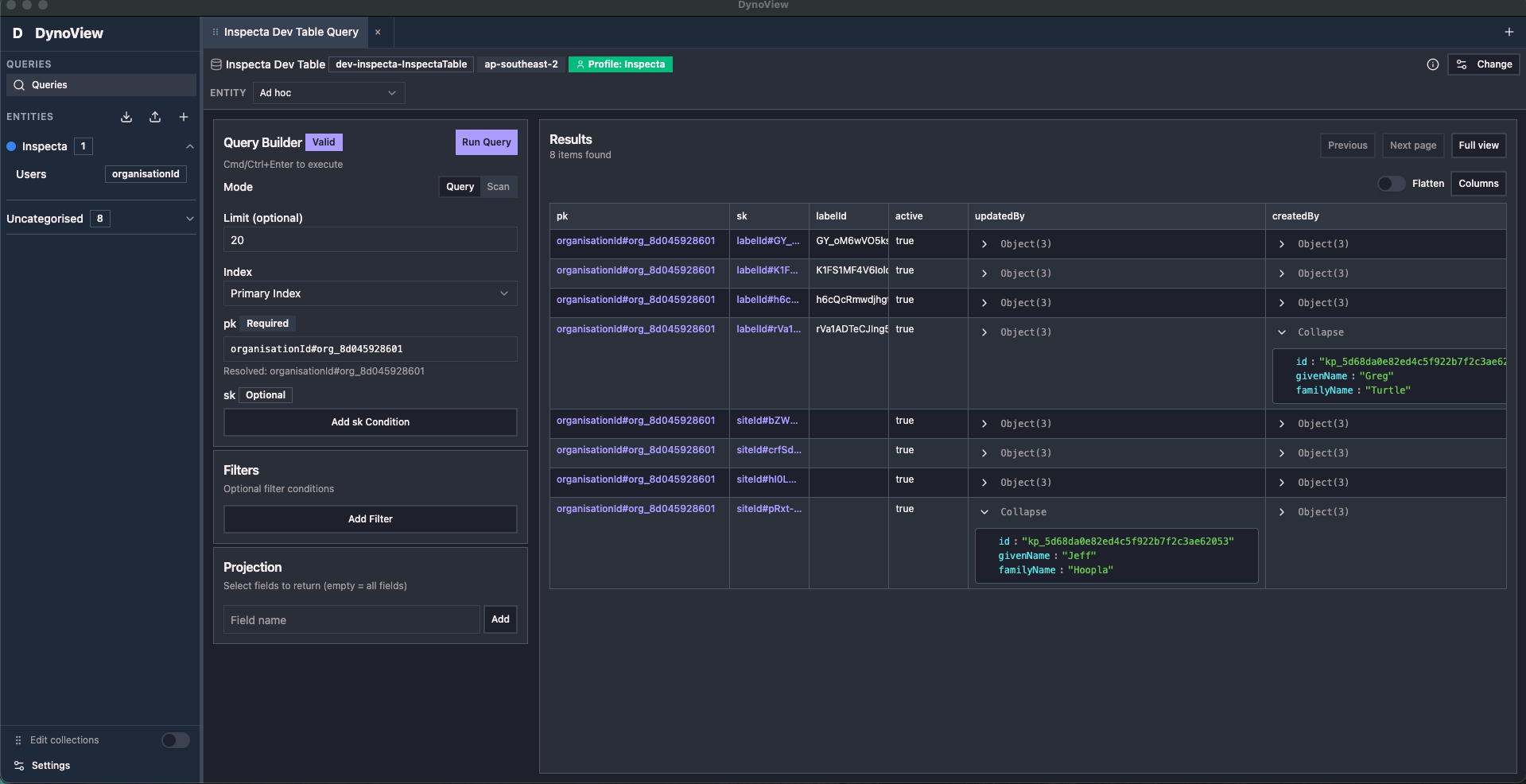
Visual Query Builder
Type-safe filters without memorizing DynamoDB expressions
DynamoDB Shouldn't Be This Hard
Built for backend and platform engineers who need to ship changes, not memorize expression syntax
The Old Way
Memorizing DynamoDB syntax and expression formats
// Wait, which attributes need # again?
// And which values need :?
// Is it FilterExpression or KeyCondition?
{
  "KeyConditionExpression": "#pk = :pk AND #sk > :sk",
  "FilterExpression": "#status = :active",
  "ExpressionAttributeNames": {
    "#pk": "userId",
    "#sk": "timestamp",
    "#status": "status"
  },
  "ExpressionAttributeValues": {
    ":pk": "user_123",
    ":sk": 1640000000,
    ":active": "ACTIVE"
  }
}The Dyno View Way
Just fill in the blanks—we handle the complexity
The Old Way
Constantly looking up how your single-table design works
The Dyno View Way
Templates remember your access patterns for you
DynamoDB Query Templates: Your Secret Weapon
Never forget how your single-table design is structured. Save your PK/SK patterns as templates and access any entity instantly.
Screenshot Placeholder
Add screenshot of Template Library showing saved templates with variables, descriptions, and one-click run buttons
Recommended: 1200x800px PNG showing template UI
Remember Your Access Patterns
Single-table designs are powerful but complex. Templates help you remember how each entity's PK/SK is structured so you can access your data without constantly referencing documentation.
Build Your Query Visually
Use the visual builder to create your query—no syntax required
Add Variables for Entity IDs
Use {{userId}}, {{orderId}}, or {{email}} in your PK/SK patterns
Save & Share Access Patterns
Name templates by entity ("Get User Profile", "List Order Items")—your whole team knows how to access each entity
Query Any Entity Instantly
Fill in the userId, orderId, or email—template handles the PK/SK structure for you
User Entity Access
Remember your single-table PK/SK pattern for users
PK = USER#{{userId}}SK = PROFILE#{{userId}}Order Items Query
Query all items for an order with SK prefix pattern
PK = ORDER#{{orderId}}SK begins_with ITEM#GSI Access Pattern
Query by email using GSI—save the inverted pattern
GSI1PK = EMAIL#{{email}}GSI1SK = USER#{{userId}}Point & Click DynamoDB Query Building
Forget JSON syntax. Build DynamoDB queries like you're filling out a form. Autocomplete shows you what's possible. Validation catches mistakes before you run.
- ✓No syntax memorization - just select and type
- ✓Smart autocomplete - knows your table structure
- ✓Instant validation - see errors before running
- ✓Pro mode available - switch to raw JSON anytime
Screenshot Placeholder
Add screenshot of Visual Query Builder showing autocomplete, simple form fields, and "Run Query" button
Recommended: 1200x800px PNG with UI highlights
Screenshot Placeholder
Add screenshot of Data Grid with inline editing cell highlighted, showing validation and save button
Recommended: 1200x800px PNG showing editing in action
Edit DynamoDB Data Like Excel
Click a cell, type a new value, hit Enter. That's it. No scripts, no complicated update expressions. Just straightforward editing with instant validation.
- ✓Inline editing - click cell, type, done
- ✓Type validation - can't save invalid data
- ✓Bulk operations - update multiple rows at once
- ✓Undo/redo - made a mistake? Just undo it
Connect to AWS in Seconds
Click "Connect with AWS SSO", authenticate in your browser, come back. Done. No credential copying, no CLI configuration, no wrestling with access keys. Just works.
- ✓One-click SSO login - browser-based auth
- ✓Multiple profiles - switch instantly
- ✓All regions - dropdown to change regions
- ✓Auto-refresh - sessions never expire
Screenshot Placeholder
Add screenshot showing "Connect with AWS SSO" button and profile/region dropdown
Recommended: 1200x800px PNG showing simple auth UI
Why Choose Dyno View?
Comparing ease of use across DynamoDB tools
| Feature | Dyno View | AWS Console | CLI Tools | Other GUIs |
|---|---|---|---|---|
| Visual Query Builder | ✓ Full | Limited | ✗ | Basic |
| Query Templates with Variables | ✓ Built-in | ✗ | Manual | ✗ |
| Inline Editing | ✓ Spreadsheet-like | Complex | ✗ | Limited |
| Learning Curve | Minutes | Hours | Days | Hours |
| AWS SSO (One-Click) | ✓ | ✓ | Manual setup | Varies |
| No Syntax Required | ✓ | Partial | ✗ | Partial |
| Team Template Sharing | ✓ | ✗ | ✗ | ✗ |
| Undo/Redo | ✓ | ✗ | ✗ | Limited |
Loved by Developers
Teams using Dyno View save hours every week
Company Logo 1
Company Logo 2
Company Logo 3
Company Logo 4
"I saved every access pattern as a template. Now the whole team knows exactly how to query each entity without digging through our design docs."
"Single-table design is brilliant but I always forgot the PK/SK patterns. Templates solved that completely."
"No more 'how do I query this entity' questions in Slack. Everyone just uses the templates."
DynoView Cloud Online Sync
Keep local-first control and turn on online syncing only when you want cross-device or team collaboration.
Opt-in by design
DynoView Cloud sync is optional. Keep everything local by default, then enable sync only for the projects that need it.
Online backup for team workflows
Sync templates, saved queries, and workspace state online so teammates can pick up the same patterns across machines.
Built for safe collaboration
Track changes with conflict-aware sync so your team can work quickly without overwriting each other's updates.
Download the Dyno View DynamoDB desktop app
Free download. No signup. Visual querying and template libraries in 5 minutes.
macOS (.dmg) • Windows (.exe) • Linux (.AppImage)
What You Get
Latest Release Notes
The most recent Dyno View update, at a glance.
v1.34.0
Apr 20, 20261.34.0 (2026-04-20)
Bug Fixes
- persist query tab UI state across tab changes (2db20bc)
Features
- Treat Entities as tabs + make filters sticky per tab () (23fdad2)
Need Help?
We're here to help you get started quickly